When I got back into Astronomy a few years ago one of the first things I wanted to do was to control my mount remotely. I was able to use the serial connection on my Celestron hand controller to connect to a USB-to-serial adapter connected to my PC to do this using Starry Night on my Laptop. Later I started using SkySafari to control it via WiFi (Simulation Curriculum now owns both of these platforms).
I don’t have an observatory, but I have used both these techniques for Remote Video Astronomy to control my mount from inside my house. Now that I am using USB cameras and have a USB cable already running from my laptop inside to the camera outside, I have decided to go back to controlling my mount through the single USB cable out to the telescope. My recent cameras use USB3 cables, so I first tried a USB3 powered hub at the telescope and plugged my DS26cTEC cable into it along with my USB-to-serial adapter that runs to my Celestron hand controller. I was able to use a single powered USB3 extension cable from my laptop inside to the USB3 hub at the telescope and successfully control both the camera and the mount.
However, when I tried a longer powered USB3 active extension cable I started getting a message about too many USB hubs. I was trying to figure out how many I had in my cabling and remembered something about a built in USB2 hub in the DS26cTEC! Then I realized I didn’t need a separate powered USB hub at the telescope. I went back to running my single USB3 extension cable from my laptop directly to the DS26cTEC USB3 cable at the telescope and used one of the two USB2 ports on the back of the camera to connect to the Celestron hand controller (using my USB-to-serial adapter).
Here is a picture of the cable connections to the back of my DS26cTEC. The USB3 cable goes to the USB3 active extension cable to the laptop inside. The USB2 cable goes from the back of the camera to a USB- to-serial adapter which is connected to the telescope hand controller. The other cable is power for the TEC cooling (and the USB2 hub built into the camera).

It appears an actual USB hub was put inside the Mallincam TEC cameras to have a hub above the mount. So you only need to run a single USB3 cable to the back of the TEC camera to get two extra USB2 ports at the telescope. The power needed for TEC cooling probably made it practical to power a built in hub as well. This keeps the cable management much cleaner. It only supports two USB2 connections (probably to keep from interfering with the camera communications) but basic "things" like a focuser, autoguider, filter wheel or mount control don't need USB3 speed.
Here is how I now use just a single cable for Remote Video Astronomy from inside my home (or motorhome). I will probably add a focus motor to my telescope and plug it into the other USB2 port on the back of the camera to make it easy to adjust the focus.
Here is how I now use just a single cable for Remote Video Astronomy from inside my home (or motorhome). I will probably add a focus motor to my telescope and plug it into the other USB2 port on the back of the camera to make it easy to adjust the focus.
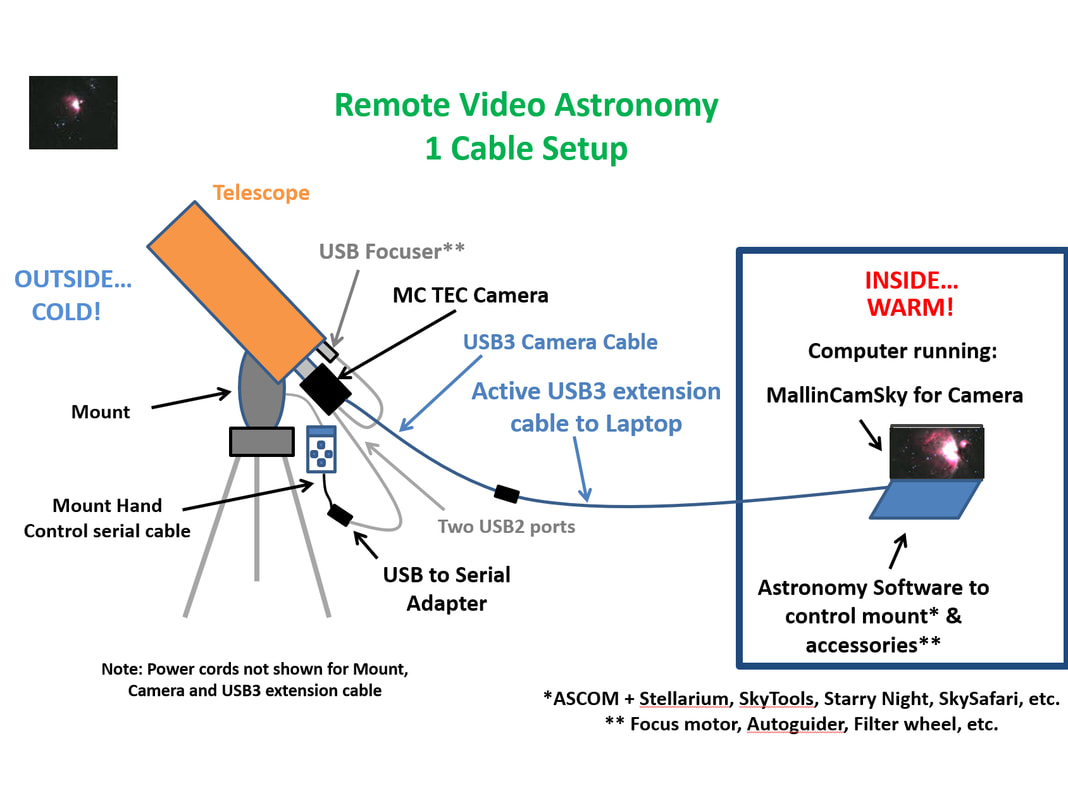
I have used my MutecPower 65 Feet Active USB Extension Cable 3.0 from my laptop inside to the DS26cTEC to control the camera and my Celestron mount with no problem. When I was initially beside the telescope I just plugged the USB3 cable that came with the DS26cTEC into my laptop to control both the camera (using MallincamSky) and mount (which is connected to the USB2 port on the back of the camera) for startup tasks (verifying operation, focusing, etc.). When I was ready to move inside, I unplugged the camera USB3 cable from my laptop and inserted the USB3 cable into the 65 foot active USB3 extension cable, then took my laptop inside and plugged the other end of the active USB3 extension cable into my laptop and resumed operation.
I successfully used Stellarium with ASCOM on my Laptop inside to select and slew to targets, make fine adjustments to center the target, etc. See my 12/20/2020 blog post “DS26cTEC focusing and centering aids” for focusing and centering examples.
I successfully used Stellarium with ASCOM on my Laptop inside to select and slew to targets, make fine adjustments to center the target, etc. See my 12/20/2020 blog post “DS26cTEC focusing and centering aids” for focusing and centering examples.
 RSS Feed